875 lines
33 KiB
Markdown
875 lines
33 KiB
Markdown

|
[](https://pub.dev/packages/test)
|
||
|
|
[](https://pub.dev/packages/test/publisher)
|
||
|
|
|
||
|
|
`test` provides a standard way of writing and running tests in Dart.
|
||
|
|
|
||
|
|
## Using package:test
|
||
|
|
|
||
|
|
* [Writing Tests](#writing-tests)
|
||
|
|
* [Running Tests](#running-tests)
|
||
|
|
* [Sharding Tests](#sharding-tests)
|
||
|
|
* [Test Concurrency](#test-concurrency)
|
||
|
|
* [Shuffling Tests](#shuffling-tests)
|
||
|
|
* [Selecting a Test Reporter](#selecting-a-test-reporter)
|
||
|
|
* [Collecting Code Coverage](#collecting-code-coverage)
|
||
|
|
* [Restricting Tests to Certain Platforms](#restricting-tests-to-certain-platforms)
|
||
|
|
* [Platform Selectors](#platform-selectors)
|
||
|
|
* [Compiler Selectors](#compiler-selectors)
|
||
|
|
* [Running Tests on Node.js](#running-tests-on-nodejs)
|
||
|
|
* [Asynchronous Tests](#asynchronous-tests)
|
||
|
|
* [Running Tests With Custom HTML](#running-tests-with-custom-html)
|
||
|
|
* [Providing a custom HTML template](#providing-a-custom-html-template)
|
||
|
|
* [Configuring Tests](#configuring-tests)
|
||
|
|
* [Skipping Tests](#skipping-tests)
|
||
|
|
* [Timeouts](#timeouts)
|
||
|
|
* [Platform-Specific Configuration](#platform-specific-configuration)
|
||
|
|
* [Whole-Package Configuration](#whole-package-configuration)
|
||
|
|
* [Tagging Tests](#tagging-tests)
|
||
|
|
* [Debugging](#debugging)
|
||
|
|
* [Browser/VM Hybrid Tests](#browservm-hybrid-tests)
|
||
|
|
* [Support for Other Packages](#support-for-other-packages)
|
||
|
|
* [`build_runner`](#build_runner)
|
||
|
|
* [`term_glyph`](#term_glyph)
|
||
|
|
* [Further Reading](#further-reading)
|
||
|
|
|
||
|
|
## Writing Tests
|
||
|
|
|
||
|
|
Tests are specified using the top-level [`test()`] function.
|
||
|
|
Test asserts can be made using [`expect` from `package:matcher`][expect]
|
||
|
|
|
||
|
|
[`test()`]: https://pub.dev/documentation/test/latest/test/test.html
|
||
|
|
|
||
|
|
[expect]: https://pub.dev/documentation/matcher/latest/expect/expect.html
|
||
|
|
|
||
|
|
```dart
|
||
|
|
import 'package:test/test.dart';
|
||
|
|
|
||
|
|
void main() {
|
||
|
|
test('String.split() splits the string on the delimiter', () {
|
||
|
|
var string = 'foo,bar,baz';
|
||
|
|
expect(string.split(','), equals(['foo', 'bar', 'baz']));
|
||
|
|
});
|
||
|
|
|
||
|
|
test('String.trim() removes surrounding whitespace', () {
|
||
|
|
var string = ' foo ';
|
||
|
|
expect(string.trim(), equals('foo'));
|
||
|
|
});
|
||
|
|
}
|
||
|
|
```
|
||
|
|
|
||
|
|
Tests can be grouped together using the [`group()`] function. Each group's
|
||
|
|
description is added to the beginning of its test's descriptions.
|
||
|
|
|
||
|
|
[`group()`]: https://pub.dev/documentation/test/latest/test/group.html
|
||
|
|
|
||
|
|
```dart
|
||
|
|
import 'package:test/test.dart';
|
||
|
|
|
||
|
|
void main() {
|
||
|
|
group('String', () {
|
||
|
|
test('.split() splits the string on the delimiter', () {
|
||
|
|
var string = 'foo,bar,baz';
|
||
|
|
expect(string.split(','), equals(['foo', 'bar', 'baz']));
|
||
|
|
});
|
||
|
|
|
||
|
|
test('.trim() removes surrounding whitespace', () {
|
||
|
|
var string = ' foo ';
|
||
|
|
expect(string.trim(), equals('foo'));
|
||
|
|
});
|
||
|
|
});
|
||
|
|
|
||
|
|
group('int', () {
|
||
|
|
test('.remainder() returns the remainder of division', () {
|
||
|
|
expect(11.remainder(3), equals(2));
|
||
|
|
});
|
||
|
|
|
||
|
|
test('.toRadixString() returns a hex string', () {
|
||
|
|
expect(11.toRadixString(16), equals('b'));
|
||
|
|
});
|
||
|
|
});
|
||
|
|
}
|
||
|
|
```
|
||
|
|
|
||
|
|
You can use the [`setUp()`] and [`tearDown()`] functions to share code between
|
||
|
|
tests. The `setUp()` callback will run before every test in a group or test
|
||
|
|
suite, and `tearDown()` will run after. `tearDown()` will run even if a test
|
||
|
|
fails, to ensure that it has a chance to clean up after itself.
|
||
|
|
|
||
|
|
```dart
|
||
|
|
import 'package:test/test.dart';
|
||
|
|
|
||
|
|
void main() {
|
||
|
|
late HttpServer server;
|
||
|
|
late Uri url;
|
||
|
|
setUp(() async {
|
||
|
|
server = await HttpServer.bind('localhost', 0);
|
||
|
|
url = Uri.parse('http://${server.address.host}:${server.port}');
|
||
|
|
});
|
||
|
|
|
||
|
|
tearDown(() async {
|
||
|
|
await server.close(force: true);
|
||
|
|
server = null;
|
||
|
|
url = null;
|
||
|
|
});
|
||
|
|
|
||
|
|
// ...
|
||
|
|
}
|
||
|
|
```
|
||
|
|
|
||
|
|
[`setUp()`]: https://pub.dev/documentation/test/latest/test/setUp.html
|
||
|
|
|
||
|
|
[`tearDown()`]: https://pub.dev/documentation/test/latest/test/tearDown.html
|
||
|
|
|
||
|
|
## Running Tests
|
||
|
|
|
||
|
|
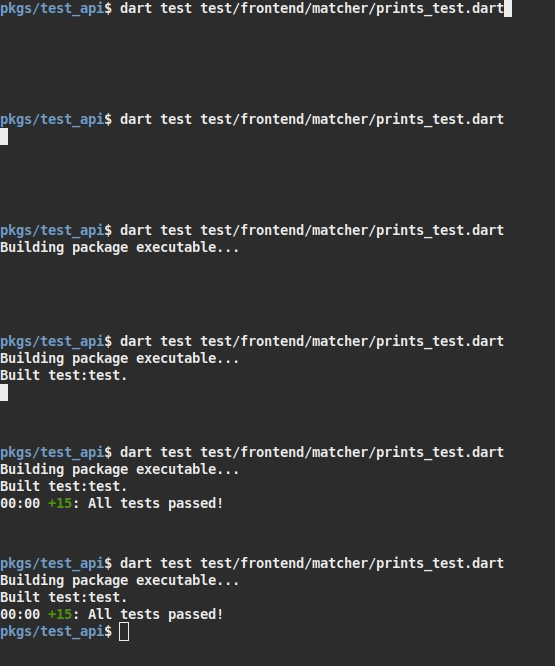
A single test file can be run just using `dart test path/to/test.dart` (as of
|
||
|
|
Dart 2.10 - prior sdk versions must use `pub run test` instead of `dart test`).
|
||
|
|
|
||
|
|
|
||
|
|
|
||
|
|
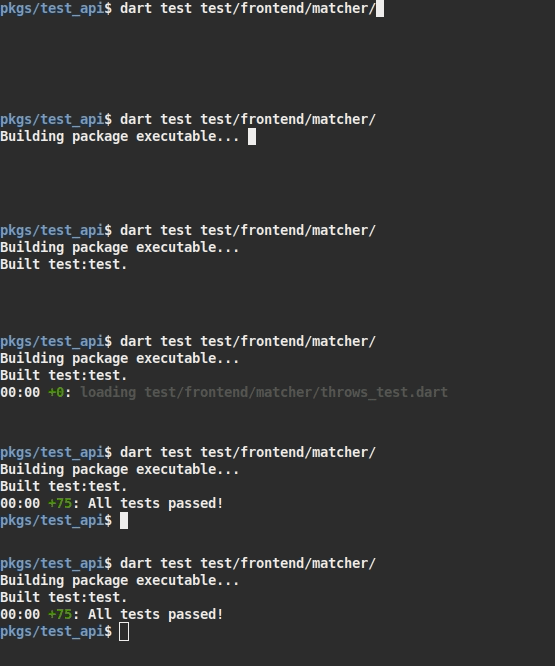
Many tests can be run at a time using `dart test path/to/dir`.
|
||
|
|
|
||
|
|
|
||
|
|
|
||
|
|
It's also possible to run a test on the Dart VM only by invoking it using `dart
|
||
|
|
path/to/test.dart`, but this doesn't load the full test runner and will be
|
||
|
|
missing some features.
|
||
|
|
|
||
|
|
The test runner accepts one or more path arguments. If there are no path
|
||
|
|
arguments the runner defaults to running tests under the `test/` directory. When
|
||
|
|
running for `test/` or any other directory, the runner will recursively search
|
||
|
|
the directory for files that match the test name pattern `*_test.dart`. The
|
||
|
|
pattern can be overridden in `dart_test.yaml`. When a path argument is a file
|
||
|
|
instead of a directory it will be run as a test, regardless of the file name.
|
||
|
|
Arguments which use shell globbing should avoid including non-test files in the
|
||
|
|
path argument. Tests which are run by other test runners may use a different
|
||
|
|
default path, such as `integration_test/`. Directories other than `test/` are
|
||
|
|
ignored by `dart test` unless passed explicitly as a path to run.
|
||
|
|
|
||
|
|
You can select specific tests cases to run by name using `dart test -n "test
|
||
|
|
name"`. The string is interpreted as a regular expression, and only tests whose
|
||
|
|
description (including any group descriptions) match that regular expression
|
||
|
|
will be run. You can also use the `-N` flag to run tests whose names contain a
|
||
|
|
plain-text string.
|
||
|
|
|
||
|
|
By default, tests are run in the Dart VM, but you can run them in the browser as
|
||
|
|
well by passing `dart test -p chrome path/to/test.dart`. `test` will take
|
||
|
|
care of starting the browser and loading the tests, and all the results will be
|
||
|
|
reported on the command line just like for VM tests. In fact, you can even run
|
||
|
|
tests on both platforms with a single command: `dart test -p "chrome,vm"
|
||
|
|
path/to/test.dart`.
|
||
|
|
|
||
|
|
By default each platform has a default compiler, but some of them support
|
||
|
|
more than one compiler. You can choose which compiler to use by passing
|
||
|
|
`dart test -c source`, which would run all VM tests from source instead of
|
||
|
|
compiling them to kernel. This also supports targeting a specific platform
|
||
|
|
using normal platform selectors, like this `dart test -c vm:source`.
|
||
|
|
|
||
|
|
### Test Path Queries
|
||
|
|
|
||
|
|
Some query parameters are supported on test paths, which allow you to filter the
|
||
|
|
tests that will run within just those paths. These filters are merged with any
|
||
|
|
global options that are passed, and all filters must match for a test to be ran.
|
||
|
|
|
||
|
|
- **name**: Works the same as `--name` (simple contains check).
|
||
|
|
- This is the only option that supports more than one entry.
|
||
|
|
- **full-name**: Requires an exact match for the name of the test.
|
||
|
|
- **line**: Matches any test that originates from this line in the test suite.
|
||
|
|
- **col**: Matches any test that originates from this column in the test suite.
|
||
|
|
|
||
|
|
**Example Usage**: `dart test "path/to/test.dart?line=10&col=2"`
|
||
|
|
|
||
|
|
#### Line/Col Matching Semantics
|
||
|
|
|
||
|
|
The `line` and `col` filters match against the current stack trace taken from
|
||
|
|
the invocation to the `test` function, and are considered a match if
|
||
|
|
**any frame** in the trace meets **all** of the following criteria:
|
||
|
|
|
||
|
|
* The URI of the frame matches the root test suite uri.
|
||
|
|
* This means it will not match lines from imported libraries.
|
||
|
|
* If both `line` and `col` are passed, both must match **the same frame**.
|
||
|
|
* The specific `line` and `col` to be matched are defined by the tools creating
|
||
|
|
the stack trace. This generally means they are 1 based and not 0 based, but
|
||
|
|
this package is not in control of the exact semantics and they may vary based
|
||
|
|
on platform implementations.
|
||
|
|
|
||
|
|
### Sharding Tests
|
||
|
|
|
||
|
|
Tests can also be sharded with the `--total-shards` and `--shard-index` arguments,
|
||
|
|
allowing you to split up your test suites and run them separately. For example,
|
||
|
|
if you wanted to run 3 shards of your test suite, you could run them as follows:
|
||
|
|
|
||
|
|
```bash
|
||
|
|
dart test --total-shards 3 --shard-index 0 path/to/test.dart
|
||
|
|
dart test --total-shards 3 --shard-index 1 path/to/test.dart
|
||
|
|
dart test --total-shards 3 --shard-index 2 path/to/test.dart
|
||
|
|
```
|
||
|
|
Sharding: This refers to the process of splitting up a large test suite into
|
||
|
|
smaller subsets (called shards) that can be run independently. Sharding is
|
||
|
|
particularly useful for distributed testing, where multiple machines are used
|
||
|
|
to run tests simultaneously. By dividing the test suite into smaller subsets,
|
||
|
|
you can run tests in parallel across multiple machines, which can significantly
|
||
|
|
reduce the overall testing time.
|
||
|
|
|
||
|
|
### Test concurrency
|
||
|
|
|
||
|
|
Test suites run concurrently by default, using half of the host's CPU cores. Use
|
||
|
|
`--concurrency` to control the number of test suites that runs concurrently,
|
||
|
|
meaning that multiple tests in independent suites or platforms can run at the
|
||
|
|
same time. For example, if you wanted to run the tests on 4 threads, you could
|
||
|
|
run the tests as follows:
|
||
|
|
|
||
|
|
```bash
|
||
|
|
dart test --concurrency=4
|
||
|
|
```
|
||
|
|
This can speed up the overall testing process, especially if you have a large
|
||
|
|
number of test suites.
|
||
|
|
|
||
|
|
### Shuffling Tests
|
||
|
|
|
||
|
|
Test order can be shuffled with the `--test-randomize-ordering-seed` argument.
|
||
|
|
This allows you to shuffle your tests with a specific seed (deterministic) or
|
||
|
|
a random seed for each run. For example, consider the following test runs:
|
||
|
|
|
||
|
|
```bash
|
||
|
|
dart test --test-randomize-ordering-seed=12345
|
||
|
|
dart test --test-randomize-ordering-seed=random
|
||
|
|
```
|
||
|
|
|
||
|
|
Setting `--test-randomize-ordering-seed=0` will have the same effect as not
|
||
|
|
specifying it at all, meaning the test order will remain as-is.
|
||
|
|
|
||
|
|
### Selecting a Test Reporter
|
||
|
|
|
||
|
|
You can adjust the output format of test results using the `--reporter=<option>`
|
||
|
|
command line flag. The default format is the `compact` output format - a single
|
||
|
|
line, continuously updated as tests are run. When running on the GitHub Actions CI
|
||
|
|
however (detected via checking the `GITHUB_ACTIONS` environment variable for `true`),
|
||
|
|
the default changes to the `github` output format - a reporter customized
|
||
|
|
for that CI/CD system.
|
||
|
|
|
||
|
|
The available options for the `--reporter` flag are:
|
||
|
|
|
||
|
|
- `compact`: a single, continuously updated line
|
||
|
|
- `expanded`: a separate line for each update
|
||
|
|
- `github`: a custom reporter for GitHub Actions
|
||
|
|
- `json`: a machine-readable format; see https://dart.dev/go/test-docs/json_reporter.md
|
||
|
|
|
||
|
|
### Collecting Code Coverage
|
||
|
|
|
||
|
|
To collect code coverage, you can run tests with the `--coverage <directory>`
|
||
|
|
argument. The directory specified can be an absolute or relative path.
|
||
|
|
If a directory does not exist at the path specified, a directory will be
|
||
|
|
created. If a directory does exist, files may be overwritten with the latest
|
||
|
|
coverage data, if they conflict.
|
||
|
|
|
||
|
|
This option will enable code coverage collection on a suite-by-suite basis,
|
||
|
|
and the resulting coverage files will be outputted in the directory specified.
|
||
|
|
The files can then be formatted using the `package:coverage`
|
||
|
|
`format_coverage` executable.
|
||
|
|
|
||
|
|
Coverage gathering is currently only implemented for tests run on the Dart VM or
|
||
|
|
Chrome.
|
||
|
|
|
||
|
|
Here's an example of how to run tests and format the collected coverage to LCOV:
|
||
|
|
|
||
|
|
```shell
|
||
|
|
## Run Dart tests and output them at directory `./coverage`:
|
||
|
|
dart run test --coverage=./coverage
|
||
|
|
|
||
|
|
## Activate package `coverage` (if needed):
|
||
|
|
dart pub global activate coverage
|
||
|
|
|
||
|
|
## Format collected coverage to LCOV (only for directory "lib")
|
||
|
|
dart pub global run coverage:format_coverage --packages=.dart_tool/package_config.json --report-on=lib --lcov -o ./coverage/lcov.info -i ./coverage
|
||
|
|
|
||
|
|
## Generate LCOV report:
|
||
|
|
genhtml -o ./coverage/report ./coverage/lcov.info
|
||
|
|
|
||
|
|
## Open the HTML coverage report:
|
||
|
|
open ./coverage/report/index.html
|
||
|
|
```
|
||
|
|
|
||
|
|
* *LCOV is a GNU tool which provides information about what parts of a program are
|
||
|
|
actually executed (i.e. "covered") while running a particular test case.*
|
||
|
|
* The binary `genhtml` is one of the LCOV tools.
|
||
|
|
* See the LCOV project for more: https://github.com/linux-test-project/lcov
|
||
|
|
* See the Homebrew LCOV formula: https://formulae.brew.sh/formula/lcov
|
||
|
|
|
||
|
|
### Restricting Tests to Certain Platforms
|
||
|
|
|
||
|
|
Some test files only make sense to run on particular platforms. They may use
|
||
|
|
`dart:html` or `dart:io`, they might test Windows' particular filesystem
|
||
|
|
behavior, or they might use a feature that's only available in Chrome. The
|
||
|
|
[`@TestOn`] annotation makes it easy to declare exactly which platforms a test
|
||
|
|
file should run on. Just put it at the top of your file, before any `library` or
|
||
|
|
`import` declarations:
|
||
|
|
|
||
|
|
```dart
|
||
|
|
@TestOn('vm')
|
||
|
|
|
||
|
|
import 'dart:io';
|
||
|
|
|
||
|
|
import 'package:test/test.dart';
|
||
|
|
|
||
|
|
void main() {
|
||
|
|
// ...
|
||
|
|
}
|
||
|
|
```
|
||
|
|
|
||
|
|
[`@TestOn`]: https://pub.dev/documentation/test/latest/test/TestOn-class.html
|
||
|
|
|
||
|
|
The string you pass to `@TestOn` is what's called a "platform selector", and it
|
||
|
|
specifies exactly which platforms a test can run on. It can be as simple as the
|
||
|
|
name of a platform, or a more complex Dart-like boolean expression involving
|
||
|
|
these platform names.
|
||
|
|
|
||
|
|
You can also declare that your entire package only works on certain platforms by
|
||
|
|
adding a [`test_on` field] to your package config file.
|
||
|
|
|
||
|
|
[`test_on` field]: https://github.com/dart-lang/test/blob/master/pkgs/test/doc/configuration.md#test_on
|
||
|
|
|
||
|
|
### Platform Selectors
|
||
|
|
|
||
|
|
Platform selectors use the [boolean selector syntax] defined in the
|
||
|
|
[`boolean_selector`] package, which is a subset of Dart's expression syntax that
|
||
|
|
only supports boolean operations. The following identifiers are defined:
|
||
|
|
|
||
|
|
[boolean selector syntax]: https://github.com/dart-lang/boolean_selector/blob/master/README.md
|
||
|
|
|
||
|
|
[`boolean_selector`]: https://pub.dev/packages/boolean_selector
|
||
|
|
|
||
|
|
* `vm`: Whether the test is running on the command-line Dart VM.
|
||
|
|
|
||
|
|
* `chrome`: Whether the test is running on Google Chrome.
|
||
|
|
|
||
|
|
* `firefox`: Whether the test is running on Mozilla Firefox.
|
||
|
|
|
||
|
|
* `safari`: Whether the test is running on Apple Safari.
|
||
|
|
|
||
|
|
* `edge`: Whether the test is running on Microsoft Edge browser.
|
||
|
|
|
||
|
|
* `node`: Whether the test is running on Node.js.
|
||
|
|
|
||
|
|
* `dart-vm`: Whether the test is running on the Dart VM in any context. It's
|
||
|
|
identical to `!js`.
|
||
|
|
|
||
|
|
* `browser`: Whether the test is running in any browser.
|
||
|
|
|
||
|
|
* `js`: Whether the test has been compiled to JS. This is identical to
|
||
|
|
`!dart-vm`.
|
||
|
|
|
||
|
|
* `blink`: Whether the test is running in a browser that uses the Blink
|
||
|
|
rendering engine.
|
||
|
|
|
||
|
|
* `windows`: Whether the test is running on Windows. This can only be `true` if
|
||
|
|
either `vm` or `node` is true.
|
||
|
|
|
||
|
|
* `mac-os`: Whether the test is running on MacOS. This can only be `true` if
|
||
|
|
either `vm` or `node` is true.
|
||
|
|
|
||
|
|
* `linux`: Whether the test is running on Linux. This can only be `true` if
|
||
|
|
either `vm` or `node` is true.
|
||
|
|
|
||
|
|
* `android`: Whether the test is running on Android. If `vm` is false, this will
|
||
|
|
be `false` as well, which means that this *won't* be true if the test is
|
||
|
|
running on an Android browser.
|
||
|
|
|
||
|
|
* `ios`: Whether the test is running on iOS. If `vm` is false, this will be
|
||
|
|
`false` as well, which means that this *won't* be true if the test is running
|
||
|
|
on an iOS browser.
|
||
|
|
|
||
|
|
* `posix`: Whether the test is running on a POSIX operating system. This is
|
||
|
|
equivalent to `!windows`.
|
||
|
|
|
||
|
|
* `dart2js`: Whether the test has been compiled with Dart2Js.
|
||
|
|
|
||
|
|
* `dart2wasm`: Whether the test has been compiled with Dart2Wasm.
|
||
|
|
|
||
|
|
* `kernel`: Whether the test has been compiled to kernel.
|
||
|
|
|
||
|
|
* `source`: Whether the test has been run with no compiler (from source).
|
||
|
|
|
||
|
|
For example, if you wanted to run a test on every browser but Chrome, you would
|
||
|
|
write `@TestOn('browser && !chrome')`.
|
||
|
|
|
||
|
|
### Running Tests on Node.js
|
||
|
|
|
||
|
|
The test runner also supports compiling tests to JavaScript and running them on
|
||
|
|
[Node.js] by passing `--platform node`. Note that Node has access to *neither*
|
||
|
|
`dart:html` nor `dart:io`, so any platform-specific APIs will have to be invoked
|
||
|
|
using the [`js`] package. However, it may be useful when testing APIs that are
|
||
|
|
meant to be used by JavaScript code.
|
||
|
|
|
||
|
|
[Node.js]: https://nodejs.org/en/
|
||
|
|
|
||
|
|
[`js`]: https://pub.dev/packages/js
|
||
|
|
|
||
|
|
The test runner looks for an executable named `node` (on Mac OS or Linux) or
|
||
|
|
`node.exe` (on Windows) on your system path. When compiling Node.js tests, it
|
||
|
|
passes `-Dnode=true`, so tests can determine whether they're running on Node
|
||
|
|
using [`const bool.fromEnvironment('node')`][bool.fromEnvironment]. It also sets
|
||
|
|
`--server-mode`, which will tell the compiler that `dart:html` is not available.
|
||
|
|
|
||
|
|
[bool.fromEnvironment]: https://api.dart.dev/stable/dart-core/bool/bool.fromEnvironment.html
|
||
|
|
|
||
|
|
If a top-level `node_modules` directory exists, tests running on Node.js can
|
||
|
|
import modules from it.
|
||
|
|
|
||
|
|
## Asynchronous Tests
|
||
|
|
|
||
|
|
Tests written with `async`/`await` will work automatically. The test runner
|
||
|
|
won't consider the test finished until the returned `Future` completes.
|
||
|
|
|
||
|
|
```dart
|
||
|
|
import 'dart:async';
|
||
|
|
|
||
|
|
import 'package:test/test.dart';
|
||
|
|
|
||
|
|
void main() {
|
||
|
|
test('Future.value() returns the value', () async {
|
||
|
|
var value = await Future.value(10);
|
||
|
|
expect(value, equals(10));
|
||
|
|
});
|
||
|
|
}
|
||
|
|
```
|
||
|
|
|
||
|
|
### Uncaught Async Errors
|
||
|
|
|
||
|
|
Any uncaught asynchronous error throws within the zone that a test is running in
|
||
|
|
will cause the test to be considered a failure. This can cause a test which was
|
||
|
|
previously considered complete and passing to change into a failure if the
|
||
|
|
uncaught async error is raised late. If all test cases within the suite have
|
||
|
|
completed this may cause some errors to be missed, or to surface in only some
|
||
|
|
runs.
|
||
|
|
|
||
|
|
Avoid uncaught async errors by ensuring that all futures have an error handler
|
||
|
|
[before they complete as an error][early-handler].
|
||
|
|
|
||
|
|
[early-handler]:https://dart.dev/guides/libraries/futures-error-handling#potential-problem-failing-to-register-error-handlers-early
|
||
|
|
|
||
|
|
## Running Tests With Custom HTML
|
||
|
|
|
||
|
|
By default, the test runner will generate its own empty HTML file for browser
|
||
|
|
tests. However, tests that need custom HTML can create their own files. These
|
||
|
|
files have three requirements:
|
||
|
|
|
||
|
|
* They must have the same name as the test, with `.dart` replaced by `.html`. You can also
|
||
|
|
provide a configuration path to an HTML file if you want it to be reused across all tests.
|
||
|
|
See [Providing a custom HTML template](#providing-a-custom-html-template) below.
|
||
|
|
|
||
|
|
* They must contain a `link` tag with `rel="x-dart-test"` and an `href`
|
||
|
|
attribute pointing to the test script.
|
||
|
|
|
||
|
|
* They must contain `<script src="packages/test/dart.js"></script>`.
|
||
|
|
|
||
|
|
For example, if you had a test called `custom_html_test.dart`, you might write
|
||
|
|
the following HTML file:
|
||
|
|
|
||
|
|
```html
|
||
|
|
<!doctype html>
|
||
|
|
<!-- custom_html_test.html -->
|
||
|
|
<html>
|
||
|
|
<head>
|
||
|
|
<title>Custom HTML Test</title>
|
||
|
|
<link rel="x-dart-test" href="custom_html_test.dart">
|
||
|
|
<script src="packages/test/dart.js"></script>
|
||
|
|
</head>
|
||
|
|
<body>
|
||
|
|
// ...
|
||
|
|
</body>
|
||
|
|
</html>
|
||
|
|
```
|
||
|
|
|
||
|
|
### Providing a custom HTML template
|
||
|
|
|
||
|
|
If you want to share the same HTML file across all tests, you can provide a
|
||
|
|
`custom_html_template_path` configuration option to your configuration file.
|
||
|
|
This file should follow the rules above, except that instead of the link tag
|
||
|
|
add exactly one `{{testScript}}` in the place where you want the template processor to insert it.
|
||
|
|
|
||
|
|
You can also optionally use any number of `{{testName}}` placeholders which will be replaced by the test filename.
|
||
|
|
|
||
|
|
The template can't be named like any test file, as that would clash with using the
|
||
|
|
custom HTML mechanics. In such a case, an error will be thrown.
|
||
|
|
|
||
|
|
For example:
|
||
|
|
|
||
|
|
```yaml
|
||
|
|
custom_html_template_path: html_template.html.tpl
|
||
|
|
```
|
||
|
|
|
||
|
|
```html
|
||
|
|
<!doctype html>
|
||
|
|
<!-- html_template.html.tpl -->
|
||
|
|
<html>
|
||
|
|
<head>
|
||
|
|
<title>{{testName}} Test</title>
|
||
|
|
{{testScript}}
|
||
|
|
<script src="packages/test/dart.js"></script>
|
||
|
|
</head>
|
||
|
|
<body>
|
||
|
|
// ...
|
||
|
|
</body>
|
||
|
|
</html>
|
||
|
|
```
|
||
|
|
|
||
|
|
## Configuring Tests
|
||
|
|
|
||
|
|
### Skipping Tests
|
||
|
|
|
||
|
|
If a test, group, or entire suite isn't working yet, and you just want it to stop
|
||
|
|
complaining, you can mark it as "skipped". The test or tests won't be run, and,
|
||
|
|
if you supply a reason why, that reason will be printed. In general, skipping
|
||
|
|
tests indicates that they should run but is temporarily not working. If they're
|
||
|
|
fundamentally incompatible with a platform, [`@TestOn`/`testOn`][TestOn]
|
||
|
|
should be used instead.
|
||
|
|
|
||
|
|
[TestOn]: #restricting-tests-to-certain-platforms
|
||
|
|
|
||
|
|
To skip a test suite, put a `@Skip` annotation at the top of the file:
|
||
|
|
|
||
|
|
```dart
|
||
|
|
@Skip('currently failing (see issue 1234)')
|
||
|
|
|
||
|
|
import 'package:test/test.dart';
|
||
|
|
|
||
|
|
void main() {
|
||
|
|
// ...
|
||
|
|
}
|
||
|
|
```
|
||
|
|
|
||
|
|
The string you pass should describe why the test is skipped. You don't have to
|
||
|
|
include it, but it's a good idea to document why the test isn't running.
|
||
|
|
|
||
|
|
Groups and individual tests can be skipped by passing the `skip` parameter. This
|
||
|
|
can be either `true` or a String describing why the test is skipped. For
|
||
|
|
example:
|
||
|
|
|
||
|
|
```dart
|
||
|
|
import 'package:test/test.dart';
|
||
|
|
|
||
|
|
void main() {
|
||
|
|
group('complicated algorithm tests', () {
|
||
|
|
// ...
|
||
|
|
}, skip: "the algorithm isn't quite right");
|
||
|
|
|
||
|
|
test('error-checking test', () {
|
||
|
|
// ...
|
||
|
|
}, skip: 'TODO: add error-checking.');
|
||
|
|
}
|
||
|
|
```
|
||
|
|
|
||
|
|
### Timeouts
|
||
|
|
|
||
|
|
By default, tests will time out after 30 seconds of inactivity. The timeout
|
||
|
|
applies to deadlocks or cases where the test stops making progress, it does not
|
||
|
|
ensure that an overall test case or test suite completes within any set time.
|
||
|
|
|
||
|
|
Timeouts can be configured on a per-test, -group, or -suite basis. To change the
|
||
|
|
timeout for a test suite, put a `@Timeout` annotation at the top of the file:
|
||
|
|
|
||
|
|
```dart
|
||
|
|
@Timeout(Duration(seconds: 45))
|
||
|
|
|
||
|
|
import 'package:test/test.dart';
|
||
|
|
|
||
|
|
void main() {
|
||
|
|
// ...
|
||
|
|
}
|
||
|
|
```
|
||
|
|
|
||
|
|
In addition to setting an absolute timeout, you can set the timeout relative to
|
||
|
|
the default using `@Timeout.factor`. For example, `@Timeout.factor(1.5)` will
|
||
|
|
set the timeout to one and a half times as long as the default—45 seconds.
|
||
|
|
|
||
|
|
Timeouts can be set for tests and groups using the `timeout` parameter. This
|
||
|
|
parameter takes a `Timeout` object just like the annotation. For example:
|
||
|
|
|
||
|
|
```dart
|
||
|
|
import 'package:test/test.dart';
|
||
|
|
|
||
|
|
void main() {
|
||
|
|
group('slow tests', () {
|
||
|
|
// ...
|
||
|
|
|
||
|
|
test('even slower test', () {
|
||
|
|
// ...
|
||
|
|
}, timeout: Timeout.factor(2));
|
||
|
|
}, timeout: Timeout(Duration(minutes: 1)));
|
||
|
|
}
|
||
|
|
```
|
||
|
|
|
||
|
|
Nested timeouts apply in order from outermost to innermost. That means that
|
||
|
|
"even slower test" will take two minutes to time out, since it multiplies the
|
||
|
|
group's timeout by 2.
|
||
|
|
|
||
|
|
### Platform-Specific Configuration
|
||
|
|
|
||
|
|
Sometimes a test may need to be configured differently for different platforms.
|
||
|
|
Windows might run your code slower than other platforms, or your DOM
|
||
|
|
manipulation might not work right on Safari yet. For these cases, you can use
|
||
|
|
the `@OnPlatform` annotation and the `onPlatform` named parameter to `test()`
|
||
|
|
and `group()`. For example:
|
||
|
|
|
||
|
|
```dart
|
||
|
|
@OnPlatform({
|
||
|
|
// Give Windows some extra wiggle-room before timing out.
|
||
|
|
'windows': Timeout.factor(2)
|
||
|
|
})
|
||
|
|
|
||
|
|
import 'package:test/test.dart';
|
||
|
|
|
||
|
|
void main() {
|
||
|
|
test('do a thing', () {
|
||
|
|
// ...
|
||
|
|
}, onPlatform: {
|
||
|
|
'safari': Skip('Safari is currently broken (see #1234)')
|
||
|
|
});
|
||
|
|
}
|
||
|
|
```
|
||
|
|
|
||
|
|
Both the annotation and the parameter take a map. The map's keys are [platform
|
||
|
|
selectors](#platform-selectors) which describe the platforms for which the
|
||
|
|
specialized configuration applies. Its values are instances of some of the same
|
||
|
|
annotation classes that can be used for a suite: `Skip` and `Timeout`. A value
|
||
|
|
can also be a list of these values.
|
||
|
|
|
||
|
|
If multiple platforms match, the configuration is applied in order from first to
|
||
|
|
last, just as they would in nested groups. This means that for configuration
|
||
|
|
like duration-based timeouts, the last matching value wins.
|
||
|
|
|
||
|
|
You can also set up global platform-specific configuration using the
|
||
|
|
[package configuration file][configuring platforms].
|
||
|
|
|
||
|
|
[configuring platforms]: https://github.com/dart-lang/test/blob/master/pkgs/test/doc/configuration.md#configuring-platforms
|
||
|
|
|
||
|
|
### Tagging Tests
|
||
|
|
|
||
|
|
Tags are short strings that you can associate with tests, groups, and suites.
|
||
|
|
They don't have any built-in meaning, but they're very useful nonetheless: you
|
||
|
|
can associate your own custom configuration with them, or you can use them to
|
||
|
|
easily filter tests so you only run the ones you need to.
|
||
|
|
|
||
|
|
Tags are defined using the `@Tags` annotation for suites and the `tags` named
|
||
|
|
parameter to `test()` and `group()`. For example:
|
||
|
|
|
||
|
|
```dart
|
||
|
|
@Tags(['browser'])
|
||
|
|
|
||
|
|
import 'package:test/test.dart';
|
||
|
|
|
||
|
|
void main() {
|
||
|
|
test('successfully launches Chrome', () {
|
||
|
|
// ...
|
||
|
|
}, tags: 'chrome');
|
||
|
|
|
||
|
|
test('launches two browsers at once', () {
|
||
|
|
// ...
|
||
|
|
}, tags: ['chrome', 'firefox']);
|
||
|
|
}
|
||
|
|
```
|
||
|
|
|
||
|
|
If the test runner encounters a tag that wasn't declared in the
|
||
|
|
[package configuration file][configuring tags], it'll print a warning, so be
|
||
|
|
sure to include all your tags there. You can also use the file to provide
|
||
|
|
default configuration for tags, like giving all `browser` tests twice as much
|
||
|
|
time before they time out.
|
||
|
|
|
||
|
|
[configuring tags]: https://github.com/dart-lang/test/blob/master/pkgs/test/doc/configuration.md#configuring-tags
|
||
|
|
|
||
|
|
Tests can be filtered based on their tags by passing command line flags. The
|
||
|
|
`--tags` or `-t` flag will cause the test runner to only run tests with the
|
||
|
|
given tags, and the `--exclude-tags` or `-x` flag will cause it to only run
|
||
|
|
tests *without* the given tags. These flags also support
|
||
|
|
[boolean selector syntax]. For example, you can pass `--tags "(chrome ||
|
||
|
|
firefox) && !slow"` to select quick Chrome or Firefox tests.
|
||
|
|
|
||
|
|
Note that tags must be valid Dart identifiers, although they may also contain
|
||
|
|
hyphens.
|
||
|
|
|
||
|
|
### Whole-Package Configuration
|
||
|
|
|
||
|
|
For configuration that applies across multiple files, or even the entire
|
||
|
|
package, `test` supports a configuration file called `dart_test.yaml`. At its
|
||
|
|
simplest, this file can contain the same sort of configuration that can be
|
||
|
|
passed as command-line arguments:
|
||
|
|
|
||
|
|
```yaml
|
||
|
|
# This package's tests are very slow. Double the default timeout.
|
||
|
|
timeout: 2x
|
||
|
|
|
||
|
|
# This is a browser-only package, so test on chrome by default.
|
||
|
|
platforms: [chrome]
|
||
|
|
```
|
||
|
|
|
||
|
|
The configuration file sets new defaults. These defaults can still be overridden
|
||
|
|
by command-line arguments, just like the built-in defaults. In the example
|
||
|
|
above, you could pass `--platform firefox` to run on Firefox.
|
||
|
|
|
||
|
|
A configuration file can do much more than just set global defaults. See
|
||
|
|
[the full documentation][package config] for more details.
|
||
|
|
|
||
|
|
[package config]: https://github.com/dart-lang/test/blob/master/pkgs/test/doc/configuration.md
|
||
|
|
|
||
|
|
### Compiler flags
|
||
|
|
|
||
|
|
The test runner does not support general purpose flags to control compilation
|
||
|
|
such as `-D` defines or flags like `--no-sound-null-safety`. In most cases it is
|
||
|
|
preferable to avoid writing tests that depend on the fine-grained compiler
|
||
|
|
configuration. For instance to choose between sound and unsound null safety,
|
||
|
|
prefer to choose a language version for each test which has the desired behavior
|
||
|
|
by default - choose a language version below `2.12` to disable sound null
|
||
|
|
safety, and a language version above `2.12` to enable sound null safety. When
|
||
|
|
fine-grained configuration is unavoidable, the approach varies by platform.
|
||
|
|
|
||
|
|
Compilation for browser and node tests can be configured by passing arguments to
|
||
|
|
`dart compile js` with `--dart2js-args` options.
|
||
|
|
|
||
|
|
Fine-grained compilation configuration is not supported for the VM. Any
|
||
|
|
configuration which impacts runtime behavior for the entire VM, such as `-D`
|
||
|
|
defines (when used for non-const values) and runtime behavior experiments, will
|
||
|
|
influence both the test runner and the isolates spawned to run test suites.
|
||
|
|
Experiments which are breaking may cause incompatibilities with the test runner.
|
||
|
|
These may be specified with a `DART_VM_OPTIONS` environment variable when
|
||
|
|
running with `pub run test`, or by passing them to the `dart` command before the
|
||
|
|
`test` subcommand when using `dart test`.
|
||
|
|
|
||
|
|
## Debugging
|
||
|
|
|
||
|
|
Tests can be debugged interactively using platforms' built-in development tools.
|
||
|
|
Tests running on browsers can use those browsers' development consoles to inspect
|
||
|
|
the document, set breakpoints, and step through code. Those running on the Dart
|
||
|
|
VM use [Dart DevTools][devtools].
|
||
|
|
|
||
|
|
[devtools]: https://dart.dev/tools/dart-devtools
|
||
|
|
|
||
|
|
The first step when debugging is to pass the `--pause-after-load` flag to the
|
||
|
|
test runner. This pauses the browser after each test suite has loaded, so that
|
||
|
|
you have time to open the development tools and set breakpoints. For the Dart VM
|
||
|
|
it will print the remote debugger URL.
|
||
|
|
|
||
|
|
Once you've set breakpoints, either click the big arrow in the middle of the web
|
||
|
|
page or press Enter in your terminal to start the tests running. When you hit a
|
||
|
|
breakpoint, the runner will open its own debugging console in the terminal that
|
||
|
|
controls how tests are run. You can type "restart" there to re-run your test as
|
||
|
|
many times as you need to figure out what's going on.
|
||
|
|
|
||
|
|
Normally, browser tests are run in hidden iframes. However, when debugging, the
|
||
|
|
iframe for the current test suite is expanded to fill the browser window so you
|
||
|
|
can see and interact with any HTML it renders. Note that the Dart animation may
|
||
|
|
still be visible behind the iframe; to hide it, just add a `background-color` to
|
||
|
|
the page's HTML.
|
||
|
|
|
||
|
|
## Browser/VM Hybrid Tests
|
||
|
|
|
||
|
|
Code that's written for the browser often needs to talk to some kind of server.
|
||
|
|
Maybe you're testing the HTML served by your app, or maybe you're writing a
|
||
|
|
library that communicates over WebSockets. We call tests that run code on both
|
||
|
|
the browser and the VM **hybrid tests**.
|
||
|
|
|
||
|
|
Hybrid tests use one of two functions: [`spawnHybridCode()`] and
|
||
|
|
[`spawnHybridUri()`]. Both of these spawn Dart VM
|
||
|
|
[isolates][dart:isolate] that can import `dart:io` and other VM-only libraries.
|
||
|
|
The only difference is where the code from the isolate comes from:
|
||
|
|
`spawnHybridCode()` takes a chunk of actual Dart code, whereas
|
||
|
|
`spawnHybridUri()` takes a URL. They both return a [`StreamChannel`] that
|
||
|
|
communicates with the hybrid isolate. For example:
|
||
|
|
|
||
|
|
[`spawnHybridCode()`]: https://pub.dev/documentation/test/latest/test/spawnHybridCode.html
|
||
|
|
|
||
|
|
[`spawnHybridUri()`]: https://pub.dev/documentation/test/latest/test/spawnHybridUri.html
|
||
|
|
|
||
|
|
[dart:isolate]: https://api.dart.dev/stable/dart-isolate/dart-isolate-library.html
|
||
|
|
|
||
|
|
[`StreamChannel`]: https://pub.dev/documentation/stream_channel/latest/stream_channel/StreamChannel-class.html
|
||
|
|
|
||
|
|
```dart
|
||
|
|
// ## test/web_socket_server.dart
|
||
|
|
|
||
|
|
// The library loaded by spawnHybridUri() can import any packages that your
|
||
|
|
// package depends on, including those that only work on the VM.
|
||
|
|
import 'package:shelf/shelf_io.dart' as io;
|
||
|
|
import 'package:shelf_web_socket/shelf_web_socket.dart';
|
||
|
|
import 'package:stream_channel/stream_channel.dart';
|
||
|
|
|
||
|
|
// Once the hybrid isolate starts, it will call the special function
|
||
|
|
// hybridMain() with a StreamChannel that's connected to the channel
|
||
|
|
// returned spawnHybridCode().
|
||
|
|
hybridMain(StreamChannel channel) async {
|
||
|
|
// Start a WebSocket server that just sends "hello!" to its clients.
|
||
|
|
var server = await io.serve(webSocketHandler((webSocket, _) {
|
||
|
|
webSocket.sink.add('hello!');
|
||
|
|
}), 'localhost', 0);
|
||
|
|
|
||
|
|
// Send the port number of the WebSocket server to the browser test, so
|
||
|
|
// it knows what to connect to.
|
||
|
|
channel.sink.add(server.port);
|
||
|
|
}
|
||
|
|
|
||
|
|
|
||
|
|
// ## test/web_socket_test.dart
|
||
|
|
|
||
|
|
@TestOn('browser')
|
||
|
|
|
||
|
|
import 'dart:html';
|
||
|
|
|
||
|
|
import 'package:test/test.dart';
|
||
|
|
|
||
|
|
void main() {
|
||
|
|
test('connects to a server-side WebSocket', () async {
|
||
|
|
// Each spawnHybrid function returns a StreamChannel that communicates with
|
||
|
|
// the hybrid isolate. You can close this channel to kill the isolate.
|
||
|
|
var channel = spawnHybridUri('web_socket_server.dart');
|
||
|
|
|
||
|
|
// Get the port for the WebSocket server from the hybrid isolate.
|
||
|
|
var port = await channel.stream.first;
|
||
|
|
|
||
|
|
var socket = WebSocket('ws://localhost:$port');
|
||
|
|
var message = await socket.onMessage.first;
|
||
|
|
expect(message.data, equals('hello!'));
|
||
|
|
});
|
||
|
|
}
|
||
|
|
```
|
||
|
|
|
||
|
|

|
||
|
|
|
||
|
|
**Note**: If you write hybrid tests, be sure to add a dependency on the
|
||
|
|
`stream_channel` package, since you're using its API!
|
||
|
|
|
||
|
|
## Support for Other Packages
|
||
|
|
|
||
|
|
### `build_runner`
|
||
|
|
|
||
|
|
If you are using `package:build_runner` to build your package, then you will
|
||
|
|
need a dependency on `build_test` in your `dev_dependencies`, and then you can
|
||
|
|
use the `pub run build_runner test` command to run tests.
|
||
|
|
|
||
|
|
To supply arguments to `package:test`, you need to separate them from your build
|
||
|
|
args with a `--` argument. For example, running all web tests in release mode
|
||
|
|
would look like this `pub run build_runner test --release -- -p vm`.
|
||
|
|
|
||
|
|
### `term_glyph`
|
||
|
|
|
||
|
|
The [`term_glyph`] package provides getters for Unicode glyphs with
|
||
|
|
ASCII alternatives. `test` ensures that it's configured to produce ASCII when
|
||
|
|
the user is running on Windows, where Unicode isn't supported. This ensures that
|
||
|
|
testing libraries can use Unicode on POSIX operating systems without breaking
|
||
|
|
Windows users.
|
||
|
|
|
||
|
|
[`term_glyph`]: https://pub.dev/packages/term_glyph
|
||
|
|
|
||
|
|
## Further Reading
|
||
|
|
|
||
|
|
Check out the [API docs] for detailed information about all the functions
|
||
|
|
available to tests.
|
||
|
|
|
||
|
|
[API docs]: https://pub.dev/documentation/test/latest/
|
||
|
|
|
||
|
|
The test runner also supports a machine-readable JSON-based reporter. This
|
||
|
|
reporter allows the test runner to be wrapped and its progress presented in
|
||
|
|
custom ways (for example, in an IDE). See [the protocol documentation][json] for
|
||
|
|
more details.
|
||
|
|
|
||
|
|
[json]: https://github.com/dart-lang/test/blob/master/pkgs/test/doc/json_reporter.md
|